
1. TFLite Inference
내용은 python, Tensorflow-gpu 2.x, keras model 에 한정되어 있음을 알려드립니다.
이전 글로부터 만들어진 TFLite model로 이제 Inference을 해볼려고 합니다.
그 전에, Inference를 어디서 할 수 있는 지 알아야겠죠?
- Android
- Java 또는 C++ API를 사용하여 Inference
- iOS
- Swift 또는 Objective-C를 사용하여 Inference
- Linux
- C++ 또는 Python으로 제공되는 TFLite API를 사용하여 Inference
이번 글에서는 Linux부터 해볼게요..
다시 돌아와서 Inference, 즉 prediction를 위해서는 TFLite API인 Interpreter을 주축으로 다음과 같은 단계를 진행합니다.
- Loading a model
- .tflite 확장자를 가진 모델을 메모리에 올림
- Transforming data
- tflite 모델과 호환되도록 입력 데이터 형식을 변경
- Running inference
- tflite api를 사용하여 모델 inference를 실행
- Interpreting output
- model의 output을 device에 맞게 의미있게 변경
예제를 통해 실행 및 분석해봐요.
(모델은 이전 글에서 생성한 tflite_resnet18을 사용)
def TFLiteInference(model_path, x_test, y_test):

    interpreter = tf.lite.Interpreter(model_path=model_path) #Step 1. Load TFLite model and allocate tensors.
    interpreter.allocate_tensors()

    # Get indexes of input and output layers
    input_index = interpreter.get_input_details()[0]['index']
    output_index = interpreter.get_output_details()[0]['index']

    sum_correct = 0.0
    sum_time = 0.0
    for idx, data in enumerate(zip(x_test,y_test)):
        image = data[0]
        label = data[1]
        image = tf.expand_dims(image, axis=0) #shape will be [1,32,32,3]

        s_time = time.time()
        interpreter.set_tensor(input_index,image) #Step 2. Transform input data
        interpreter.invoke() #Step 3. Run inference
        pred=interpreter.get_tensor(output_index) #Step 4. Interpret output

        sum_time += time.time()-s_time
        if np.argmax(pred) == np.argmax(label):
            sum_correct += 1.0

    mean_acc = sum_correct / float(idx+1)
    mean_time = sum_time / float(idx+1)

    print(f'Accuracy of TFLite model: {mean_acc}')
    print(f'Inference time of TFLite model: {mean_time}')
code와 Inference단계를 매칭시켜보면서 설명드릴게요.
- Loading a model
tf.lite.Interpreter(): TFLite model을 memory에 올림.interpreter.allocate_tensors(): tensor initialization.
- Transforming data
interpreter.get_input_details(): input에 대한 다양한 정보 호출.- code내의 index element는 input layer에 대한 순서(index)를 GET함.
- 뿐만 아니라, input의 shape, data type등 다양한 정보를 호출 가능.
interpreter.set_tensor(input_index,image): TFLite model이 예측 가능하도록 image를 input layer의 위치(index)에 넣어주어 processing.
- Running Inference
interpreter.invoke(): forward GOGO!
- Interpreting output
interpreter.get_output_details()[0]['index']: 위와 같이 output layer의 index를 GET함.interpreter.get_tensor(output_index): index에 해당하는 layer 즉, output layer의 index에 해당하는 output를 GET함.
이전 글에서는 모델 크기만 비교했는데 이제는 Inference가 가능하니 keras model과 TFLite의 Test Accuracy와 Inference Time을 비교해봅시다!!
| Model | Test Acc | Inference Time (seconds) |
File size |
| pruned_resnet18 | 85.65% | 0.013s [GPU] | 507KB |
| float32_resnet18 | 85.65% | 0.002s [CPU] | 329KB |
놀랍게도(역시.. 구글...) 똑같은 linux서버환경이었지만 Test Accuracy는 동일하지만 Inference Time은 약 1/6 줄었네요! 심지어 tflite 모델은 CPU로 연산 되었지만 keras model을 GPU연산되었는데도 말이죠.
(위 결과는 batch size를 1로 진행하였습니다.)
Accuracy와 Inference Time비교하는 코드 및 위의 예제 코드와 실험 모델들은 Conquer_TFLite에서 사용가능합니다.
2. TensorFlow Lite Delegates
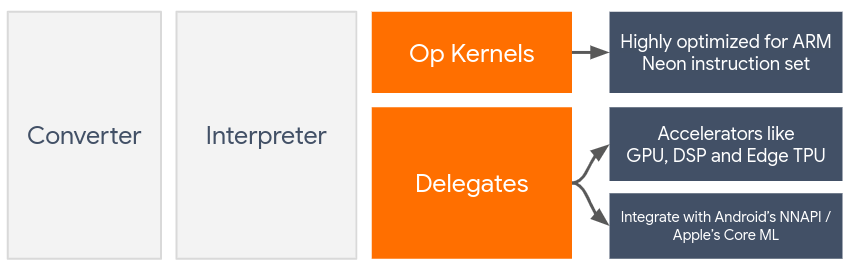
Delegates은 on-device accelerators(i.e. GPU, Digial Signal Processer (DSP))을 leveraging해서 TFLite model의 hardware acceleration을 해줍니다.
Default로 TFLite model은 ARM Neon instruction set에 최적화 되어있는 CPU kernel을 이용하게 됩니다. 하지만 multi-purpose인 CPU는 ML model이 가지는 heavy한 arithmetic을 모두 감당못합니다.
그래서, 요즘 대부분의 mobile chips들은 accelerator를 탑재하게 되는 데 이를 통해 ML model이 가지고 있는 heavy한 operations들을 cover할 수 있습니다. Speicific하게는 OpenCL 또는 OpenGL ES (for mobile)과 Qualcomm Hexagon SDK (for DSP)와 같은 accelerators들이 ML coding하면서 쓰는 custom한 computations을 가능하게 하는 API를 가지게 됩니다.
하지만, 각 accelerator는 장,단점을 가지며 모든 custom한 operations을 모두 cover하지는 못하게 되므로 process를 복잡하게 만듭니다. TFLite's Delegate API가 TFLite runtime과 lower-level APIs의 bridge역할을 하여 해당 문제를 해결하게 됩니다.
2.1 Choosing a Delegate
TFLite에서는 다양한 delegates를 제공하는 데 Platform에 따라 Delegate선택 기준은 다음과 같습니다.
- Cross-platform (Android & iOS)
- GPU Delegate
- float32,float16에 최적화 되어 있으며 int8 quantized model도 GPU performance을 제공합니다.
- Quantization-aware training도 제공합니다.
- GPU Delegate
- Android
- NNAPI Delegate
- GPU, DSP and NPU과 함께 Android device(version 8.1 이상)에서 model을 accelerate하기위해 사용됩니다.
- float16 model은 제공하지 않아요.
- Hexago Delegate
- Qualcomm Hexagon DSP함께 Android device에서 model을 accelerate하게 됩니다.
- int8과 Quantization-aware training만 가능합니다.
- NNAPI Delegate
- iOS
- Core ML Delegate
- iPhone과 iPads에 사용가능합니다.
- float32, float16만 가능해요.
- Core ML Delegate
Delegate에 대한 자세한 code나 분석은 추후에 해볼게요.
오늘은 여기까지 하고 다음 글에서는 quantization이라는 주제로 설명드리고 그 다음으로 mobile에 deploy하는 글을 쓰도록 하겠습니다.
BYE!
'AI Engineering > TensorFlow' 카테고리의 다른 글
| TensorFlow.js (1) - TensorFlow.js 이해 및 detection 예제 (1) | 2022.03.17 |
|---|---|
| Mediapipe (2) - custom segmentation model with mediapipe (0) | 2022.03.14 |
| TFLite 뽀개기 (3) - Quantization (2) | 2022.03.09 |
| TFLite 뽀개기 (1) - TFLite 기본 이해 및 사용하기 (0) | 2022.03.09 |
| Mediapipe (1) - Mediapipe 이해 및 Object detection 예제 (0) | 2022.03.08 |